

In 2026, email is no longer just a communication tool — it’s one of the most underutilized lead generation channels in your business.
Every day, your team sends hundreds (or thousands) of emails to prospects, partners, vendors, and customers. Yet most companies still treat the email signature as an afterthought: inconsistent formatting, outdated logos, missing CTAs, or worse — no branding at all.
A professional email signature, when done right, turns every email into a subtle but powerful marketing asset. With email signature automation, businesses can finally scale branding, compliance, and lead generation — without adding work for IT or employees.
Let’s break down how your everyday emails can become lead opportunities in 2026, and how Bauer Automate makes it effortless with Microsoft 365 email signature automation.
Why Email Signatures Matter More Than Ever
Think about how often your brand shows up in inboxes. Your business email signature appears:
- During sales conversations
- In customer support threads
- In vendor negotiations
- In internal and external communications
That’s thousands of brand impressions per month that is completely free!
A well-designed company email signature builds trust instantly. A poorly managed one does the opposite.
In 2026, prospects expect:
Clean, modern design Consistent branding Clickable CTAs Mobile-friendly layouts
A strong company signature signals professionalism before the email is even read.
The Problem With Manual Email Signatures
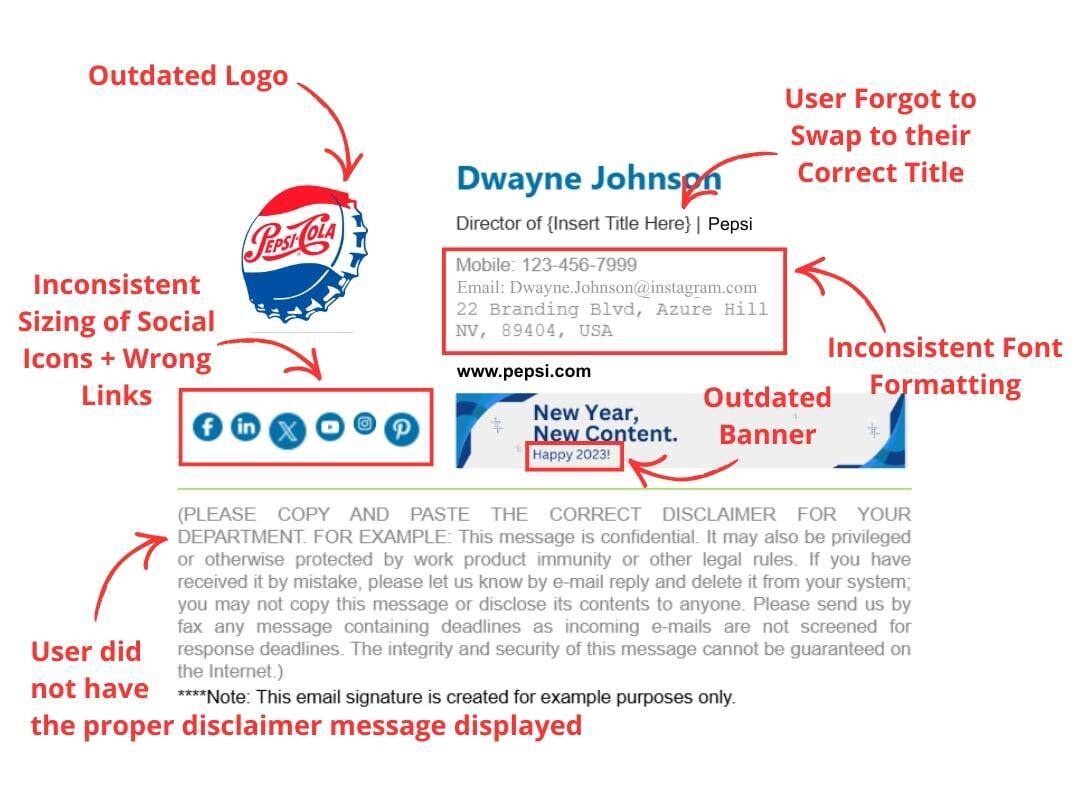
Most organizations still rely on employees to make email signatures themselves on Outlook, Gmail, or their device’s default Mail application. This creates several problems:
Outdated job titles or contact info Inconsistent fonts, logos, and layouts Missing legal disclaimers or compliance language No centralized control for marketing or IT
Manually managing a custom email signature across dozens or hundreds of users is inefficient and error-prone.
What Is Email Signature Automation?
Email signature automation allows businesses to centrally manage and deploy signatures across all users without relying on employees to update anything themselves.
With a Microsoft 365 Outlook signature automation solution, you can:
- Control every signature in Microsoft Outlook 365 from one dashboard
- Automatically apply signatures to new and existing users
- Ensure brand consistency across all departments
- Update campaigns, banners, or CTAs instantly
This is especially critical for companies with users using email tools across multiple devices and mail apps such as Outlook desktop, Outlook web, and the phone or tablet’s default Mail application. Bauer Automate’s Email Signature Automation service ensures that your signature is standardized no matter which device or app you’re on, from any location in the world (yes, even when using the random computer in your vacation hotel’s office boardroom!)
Turning Email Signatures Into Lead Engines
A modern professional email signature does more than show contact details — it actively drives engagement.
Here’s how companies are using Microsoft 365 email signatures to generate leads in 2026:
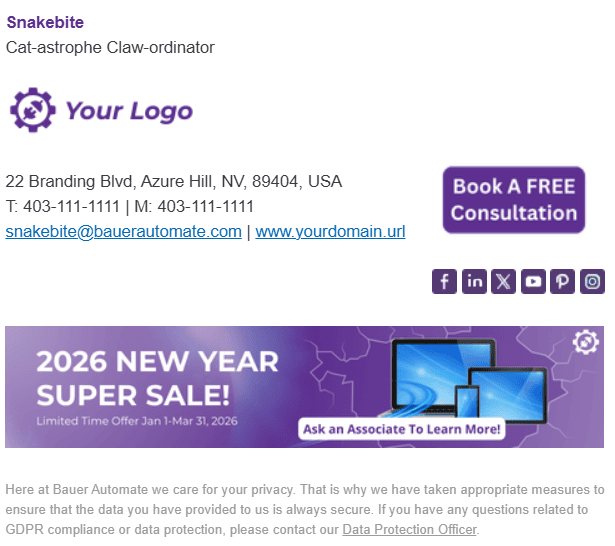
1. Promote Key Offers
Add banners or links to:
Free consultations Current Promotions Demos Webinars Case studies
Every outgoing email becomes a touchpoint.
2. Reinforce Brand Trust
A polished company email signature reassures recipients that they’re dealing with a credible, established business.
3. Maintain Consistency Across Teams
Sales, marketing, support, and leadership all share one cohesive brand — without manual updates.
4. Capture Passive Leads
Even routine replies can drive traffic to landing pages, booking links, or resource hubs.
Email Signature Customization Without the Headaches
Modern teams want flexibility without chaos.
With email signature custom options, you can:
- Personalize fields like name, job title, department, office location, and phone number
- Apply different designs for teams or regions
- Maintain one consistent brand framework from a centrally managed portal
This is how businesses scale personalization while keeping control. No more broken layouts. No more outdated signatures. No more manual fixes.
The Bottom Line
In 2026, your emails are already being sent — the question is whether they’re working for you. A centralized, automated business email signature for Microsoft Entra and Microsoft 365 Exchange transforms everyday communication into a consistent, professional, and lead-generating channel. If you’re already using Microsoft 365, this is one of the highest-ROI upgrades you can make.
Ready to Automate Your Microsoft 365 Email Signatures?
Book a Free Consultation or Free Demo to learn how Bauer Automate can help you take control of your email signatures, reduce IT overhead, and strengthen your professional brand.